RUST-TRANSLATE / VIDEO & AUDIO

Manage and produce video.In one desktop app.

Rust-Translate is a Windows application for creators and channel managers. Download and organize videos by topic and series, translate and dub with AI, process episodes in batches, then publish to YouTube or Facebook.

Windows x64 · Local media processing

Actual application interfaceRUST-TRANSLATE
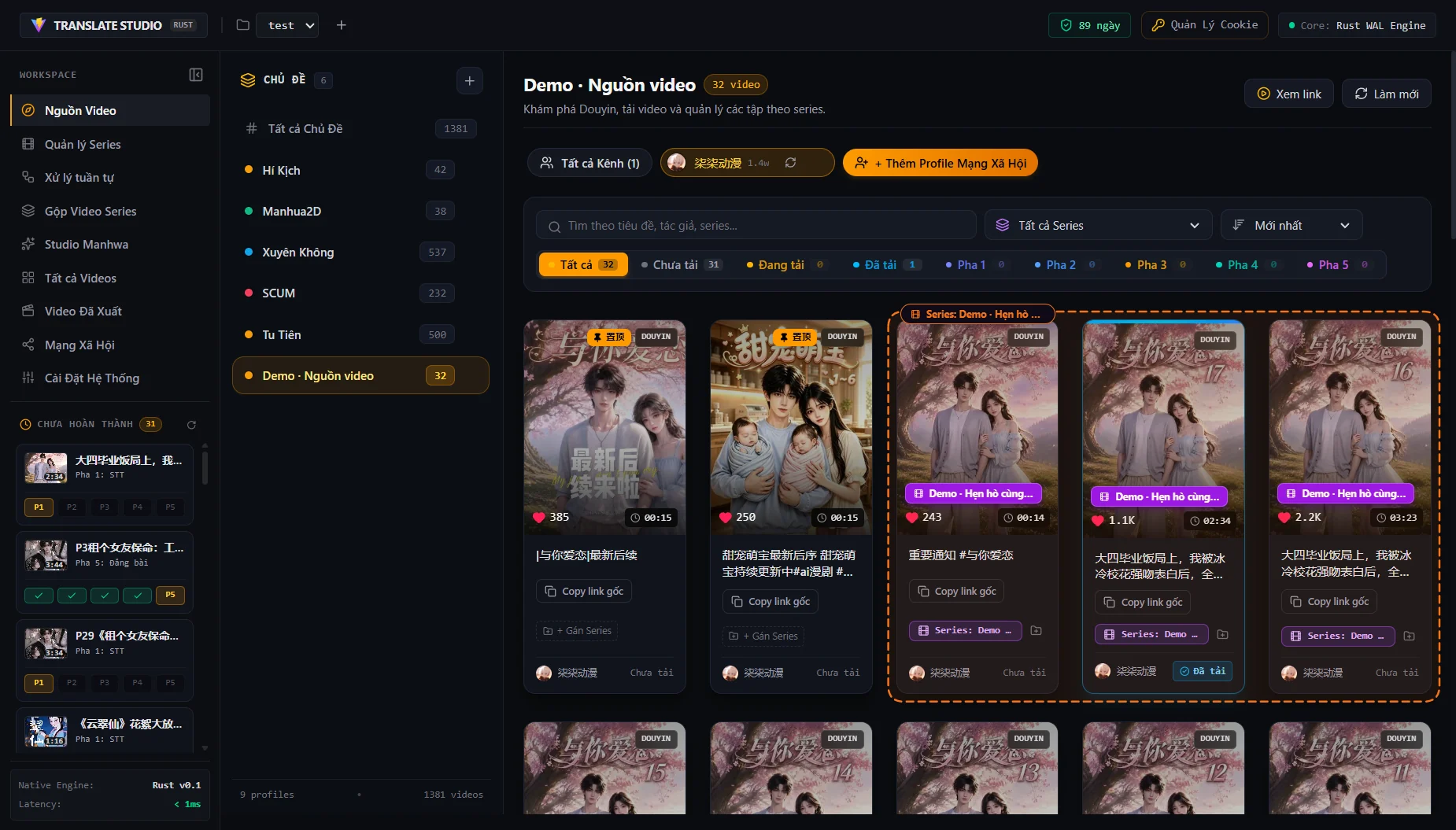
Rust-Translate showing the full sidebar, topics, a Douyin channel and videos grouped into a series.Tour the real app01:21
01Manage sources02Produce video03Publish to channels

WHAT IS RUST-TRANSLATE?

Three kinds of work. One Windows application.

Rust-Translate helps you manage sources, produce videos and publish to your channels. Use individual tools for the work at hand or connect them into a workflow for multiple episodes.

01

Bring video sources together

Keep videos from multiple channels in one place so you can find the right episode, choose content and track work already done.

  • Download across platforms or import files
  • Collect video lists from channels
  • Organize topics, series and status
See the tools in action
02

Translate, dub and refine

Adapt content to your audience’s language, review dialogue and keep subtitles and branding consistent across episodes.

  • Transcribe, translate and generate AI speech
  • Edit lines, listen and preview
  • Arrange subtitles, logos and export framing
See the tools in action
03

Publish and manage posts

Send finished videos to the right channel, prepare post content and track each upload from the app.

  • Publish to YouTube or Facebook Pages
  • AI-assisted titles, descriptions and hashtags
  • Publishing status and history
See the tools in action
Working on multiple episodes? Queue the repetitive steps.

Select videos and shared settings. The app processes them in sequence from download to export; track progress, pause or rerun when needed.

Explore batch processing
Made for
  • Video creators
  • Multilingual content channels
  • Teams managing multiple channels

THE RUST-TRANSLATE WORKFLOW

What happens to each video?

Start with a local file or an online source. Choose the stages you need to create a finished video and send it to your channel.

  1. 01

    Collect & organize sources

    Import files, download videos or collect lists from supported channels. Group them by topic and series to choose the episodes to work on.

    RESULTOrganized video sources, ready to process.
  2. 02

    Translate & create speech

    Transcribe dialogue, review the AI translation and edit individual lines. Choose a voice, listen and dub content that needs a new language.

    RESULTReviewed dialogue and voice tracks.
  3. 03

    Edit & export

    Position subtitles, titles, logos and watermarks. Choose framing, audio and export settings; combine episodes when you need a longer video.

    RESULTA video file prepared for its destination.
  4. 04

    Publish & track

    Choose a YouTube channel or Facebook Page. Prepare post content, upload the video and review publishing status and history.

    RESULTPosts and publishing history managed in the app.

You can use the tools independently. A finished video can go straight to editing or publishing; translation and dubbing are options when your content needs a new language.

EXPLORE THE REAL APPLICATION

Choose a module. See your workflow in action.

From collecting sources to publishing: choose the work you need to do and see how Rust-Translate helps you organize content, reduce repetitive work and track each video.

MODULE / 01

Video sources

Video demo
  1. 0100:00Create a topicKeep your sources organized under a dedicated topic.
  2. 0200:11Add a Douyin profilePaste the creator link and collect their video list.
  3. 0300:32Preview & downloadWatch inside the app, then download the selected video.
  4. 0400:50Group into a seriesSelect cards, create a series and see the dashed group outline.

Find, choose and organize videos at the source.

Following multiple channels can leave you with hundreds of scattered links and episodes that are hard to find again. Collect video lists from Douyin, YouTube or Bilibili channels, organize them by topic and series, then preview and choose what to download. Status filters show which videos have been downloaded, are being processed or are complete.

  • Collect channel videos
  • Preview before downloading
  • Organize by topic & series
MODULE / 02

Batch processing

App screenshot
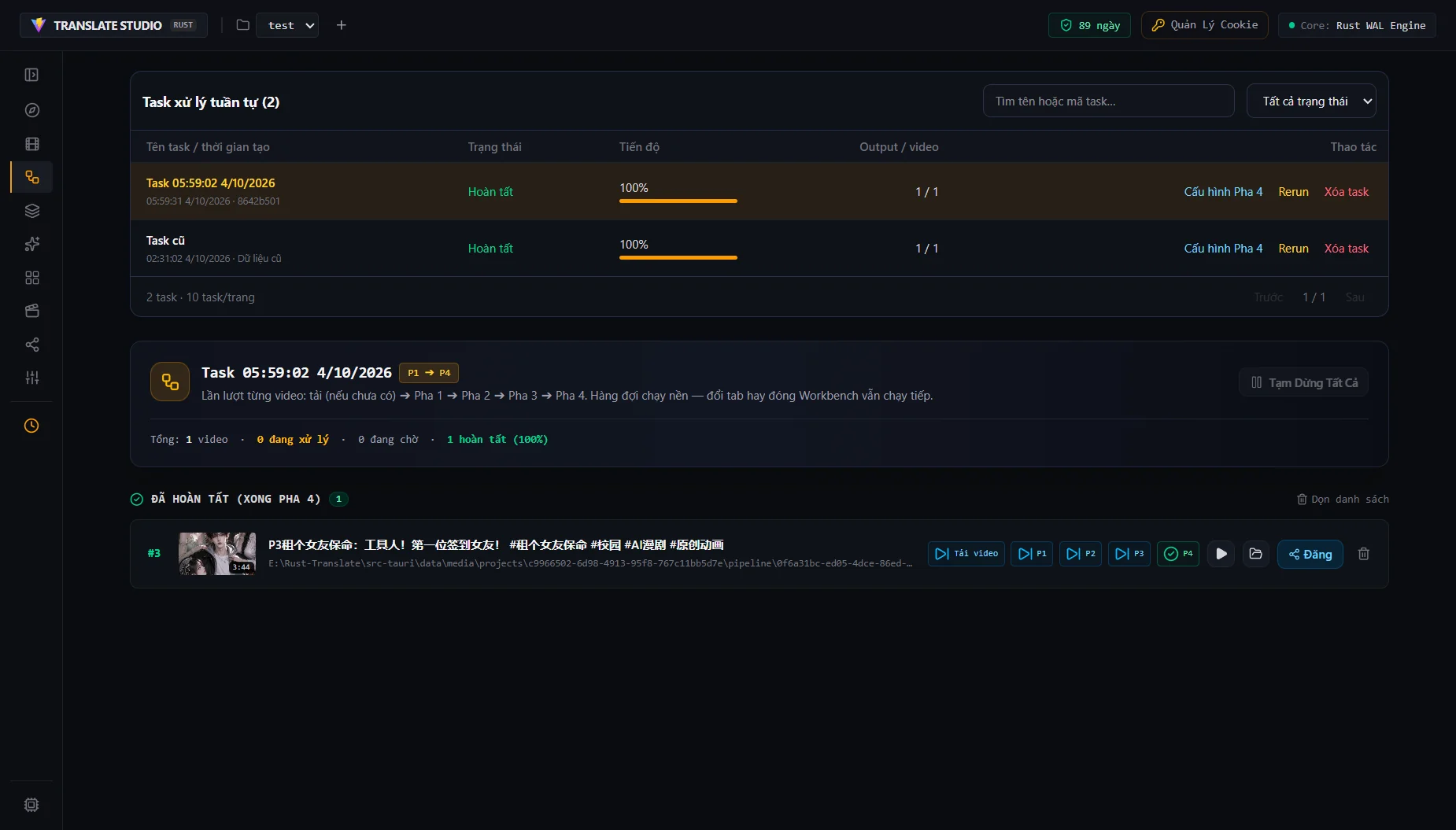
Sequential processing queue showing completed tasks, progress bars and actions for a finished video.

Turn a video list into an organized production run.

Opening each episode and repeating transcription, translation, dubbing and export takes time to manage. Select multiple videos, apply shared settings and queue them to run in sequence from source download to finished export. Track each video, pause and resume the queue, or rerun work when needed.

  • Process multiple videos
  • Reuse shared settings
  • Pause, resume & rerun

Video demo not available yet

MODULE / 03

Translation & voice

App screenshot
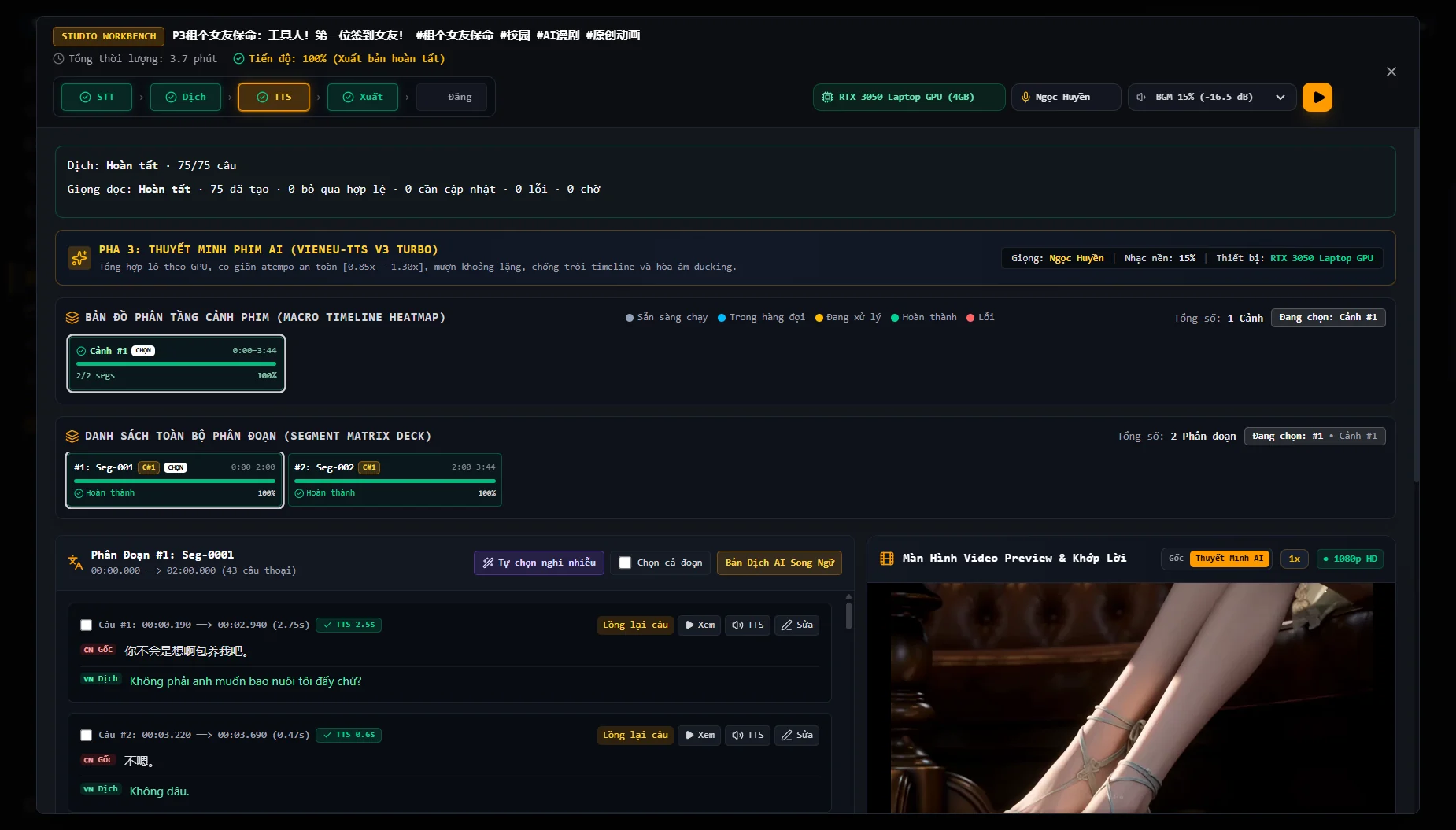
Rust-Translate Studio in the TTS stage with segments, bilingual dialogue and a video preview.

Refine the translation and voice so the story is easy to follow.

Character names, forms of address and recurring terms can become inconsistent across episodes. Transcribe dialogue, compare the original with the AI translation and edit individual lines alongside the video. Character profiles and a project dictionary help preserve context; choose an AI voice, listen to a preview and regenerate speech for a line you have changed.

  • Compare bilingual dialogue
  • Preserve character context
  • Regenerate individual lines

Video demo not available yet

MODULE / 04

Edit & export

App screenshot
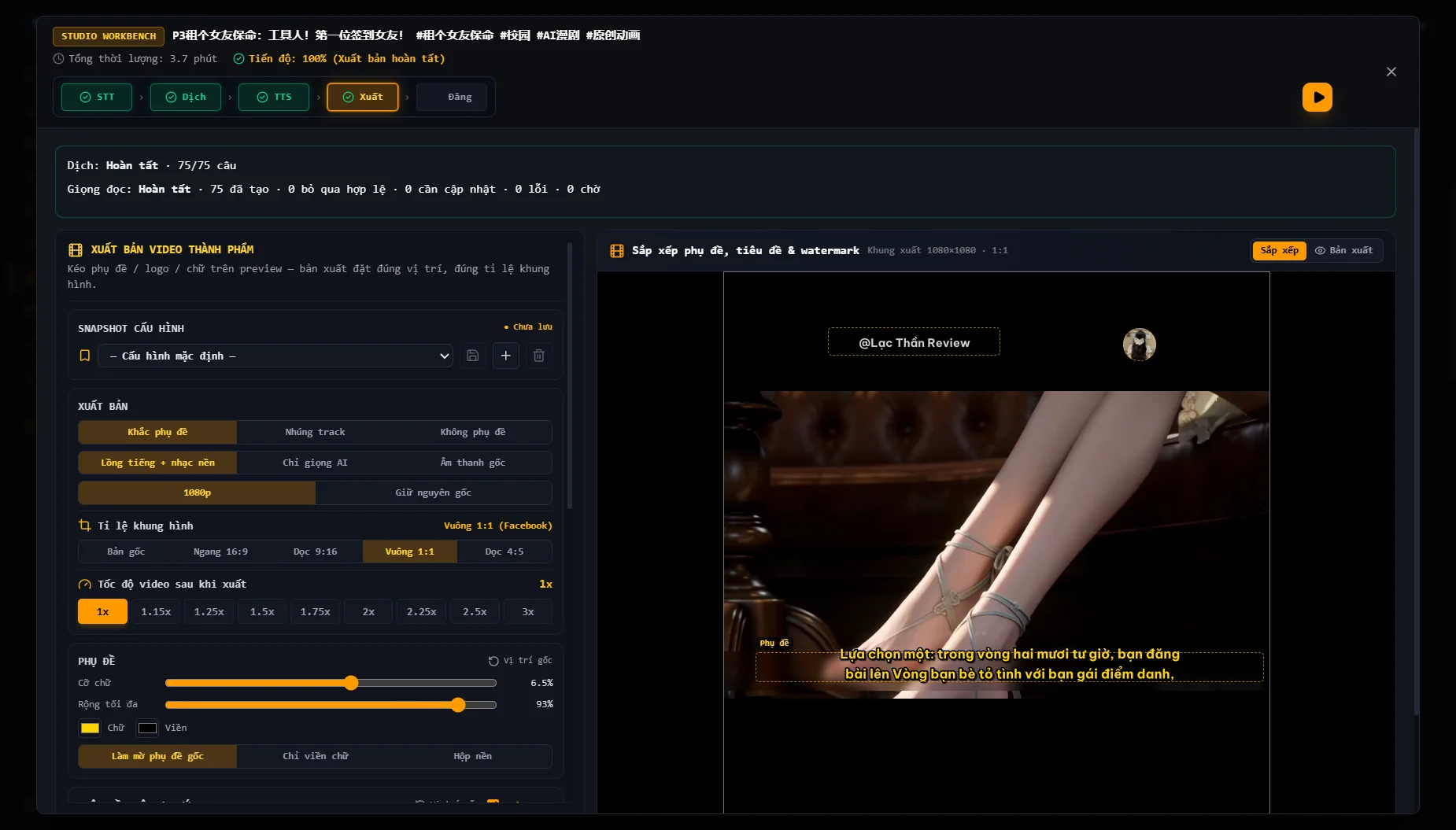
Video export interface with subtitle, audio and aspect-ratio controls and a watermark preview.

Keep subtitles, branding and video formats consistent.

Different destinations need different video formats, and rebuilding subtitle and logo layouts for each episode makes consistency harder. Drag subtitles, titles, logos and watermarks onto the video preview; choose landscape, portrait or square framing, audio and export speed. Save the configuration to reuse on your next videos.

  • Arrange elements on video
  • Landscape, portrait & square
  • Save export settings

Video demo not available yet

MODULE / 05

Social publishing

App screenshot
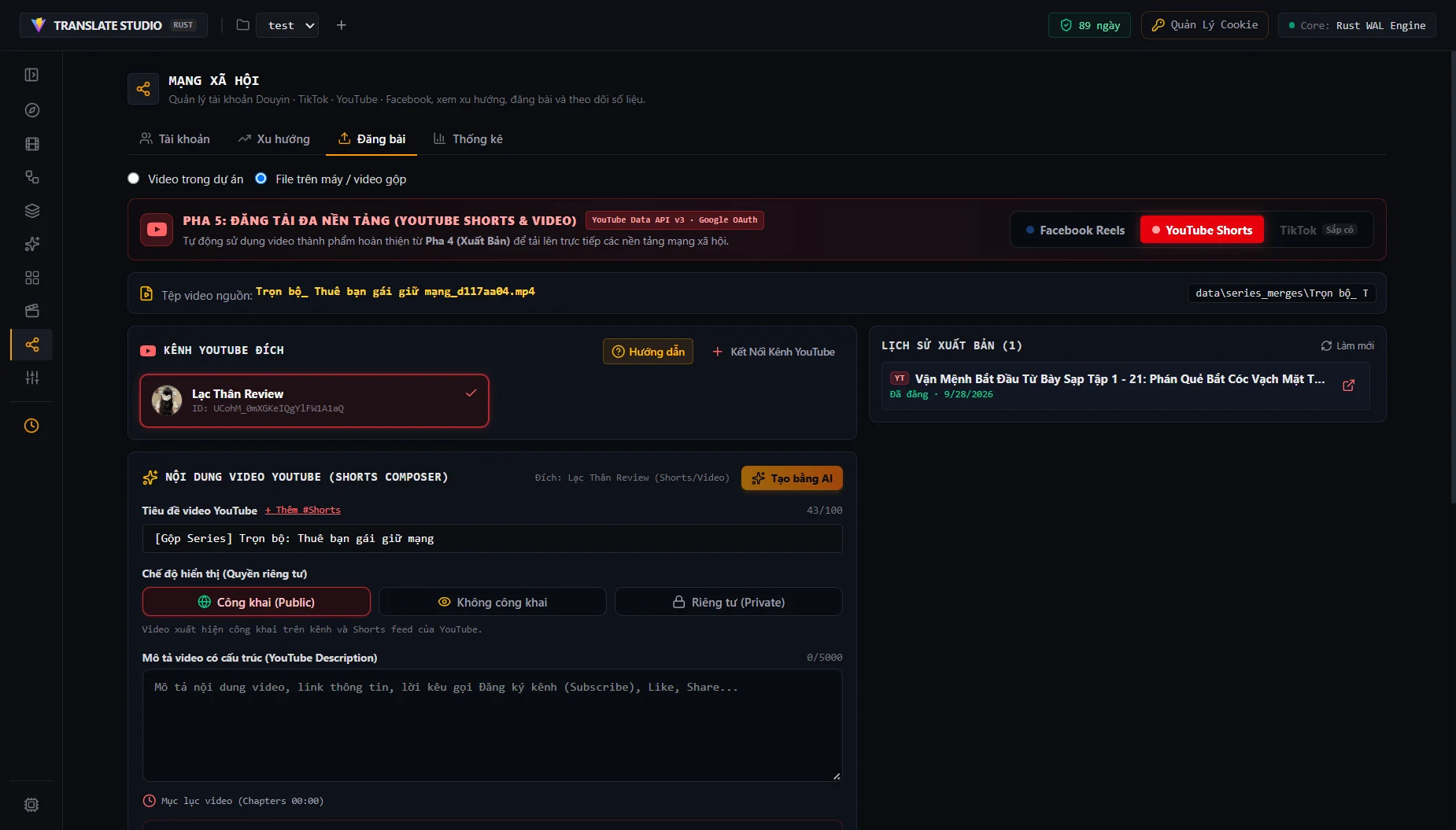
YouTube publishing interface with a destination channel, compilation file, title, description and publishing history.

Send videos to the right channel and track each upload.

Managing several channels means checking the right account, preparing post content and keeping track of each upload. Select a YouTube channel or Facebook Page, use AI to help draft the title, description and hashtags, then add a cover and publishing settings for the platform. Upload from the app and review publishing status and history.

  • YouTube & Facebook Pages
  • AI-assisted post content
  • Publishing history

Video demo not available yet

MODULE / 06

Export library

App screenshot
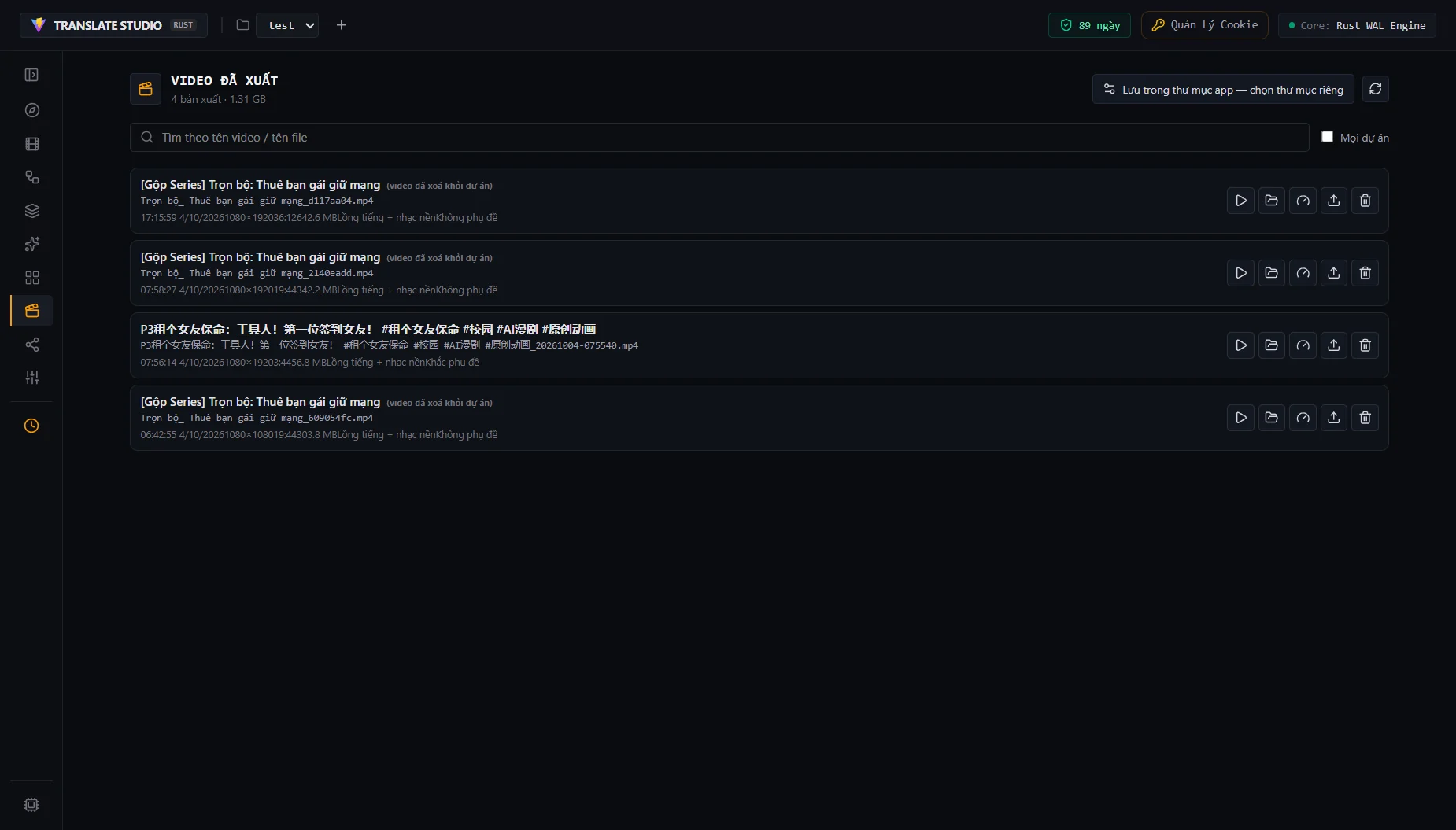
Exported Videos library listing finished videos and series compilations with social publishing actions.

Find finished work and put it to use again.

As episodes accumulate, exports scattered across folders make it harder to find the right video to review or publish. Keep exports and compilations in one library with search, playback and access to each file location. Combine series episodes into a longer video, adjust speed after export or send a finished video to social publishing.

  • Search finished videos
  • Combine series episodes
  • Publish from the library

Video demo not available yet

Videos and screenshots come directly from the desktop app. Video Sources has a recorded demo; the other modules currently show screenshots and will receive their own videos.

Captured from the app

MORE TOOLS IN THE APPLICATION

Manage the work behind each video.

Beyond the video workflow, Rust-Translate includes episode compilations and account management.

Make longer videos from episodes

Select exported episodes in a series, combine them into a longer video and keep merge history. Review a compilation or send it to publishing to reuse finished work.

Accounts, trends & metrics

Bring social accounts together, explore trends on supported platforms and review YouTube and Facebook post metrics to track channel activity.

SUPPORTED PLATFORMS

Know what you can do on each platform.

Downloading, collecting profiles and publishing have different support scopes. This table shows the integrations currently implemented in the app.

Current Rust-Translate platform integrations
PlatformDownload videosCollect profiles / channelsPublish videosTrending
YouTubeSupportedSupportedSupportedSupported
DouyinSupportedSupportedNot integratedSupported
BilibiliSupportedSupportedNot integratedSupported
TikTokSupportedNot integratedNot integratedSupported
FacebookSupportedNot integratedSupportedNot integrated
Kuaishou / KwaiSupportedNot integratedNot integratedNot integrated

Profile collectionDouyin, YouTube and Bilibili have dedicated video-list collection flows. Results depend on public content, access permissions and platform responses.

Publishing & metricsYouTube uses OAuth; Facebook requires an authorized Fanpage account. TikTok, Douyin and Bilibili publishing is not integrated. Post metrics are available for YouTube and Facebook.

Downloads & sign-inSome sources require a signed-in session or cookies. Other URLs may work through yt-dlp when compatible; availability depends on individual content and extractor versions.

Media and project data are processed and stored locally. AI translation, online TTS, downloads, social publishing and license activation may require a connection and send data to their respective providers.

GOOD TO KNOW

Before you get started.

01Who is Rust-Translate for?

Creators and channel managers collecting sources, organizing series, translating, dubbing, processing batches and publishing videos. Especially useful across multiple profiles, episodes and social accounts.

02Does every video need translation and dubbing?

No. You can collect and organize sources, edit, combine episodes or publish videos you already have. Translation and dubbing are tools for content that needs a new language; exporting also supports the original audio.

03Which platforms support profile collection and publishing?

Profile video-list collection supports Douyin, YouTube and Bilibili. Automated publishing and post metrics support YouTube and Facebook. TikTok, Douyin and Bilibili publishing is not integrated in the app.

04Which operating systems are supported?

The current packaged release is for Windows x64. This website does not offer macOS or Linux downloads.

05Do I need an internet connection?

Local media processing runs on your computer. AI translation, some voice services, online video downloads and license activation require internet access. Requirements depend on your configuration and providers.

06Where are my videos and project data stored?

Media and project data are processed and stored on your computer. AI translation, online speech, video downloads and publishing, and license activation may send data to their respective providers according to your configuration.

07Can I edit the AI translation?

Yes. Compare bilingual dialogue, edit translated lines and manage character profiles, terminology and forms of address for your project.

08How do pricing and licensing work?

Activation is managed in the app. Check license options and AI/TTS costs against your configuration, accounts and each provider’s policies. This website has not published a price list.

09Are the AI and social media tools available?

Rust-Translate already includes AI and social media management features. Additional standalone AI/social products in the ecotools ecosystem remain future directions with no release announced.
START WITH RUST-TRANSLATE

From your first video to a clear workflow.

Explore the ecotools application for video management, production and publishing. Choose the tools that fit your content and the way you work.

Get Rust-Translate for Windows